Honest Money: What Video Editors Really Make
Lesson video in production
The full lesson text below is complete — the video version lands with launch.
Honest Money: What Video Editors Really Make
Every video editing course sells the same screenshot: a payment notification and a caption about working from a beach. This lesson is the opposite of that screenshot. It gives you the real spread, top to bottom, and then the arithmetic that decides which end of it you live on. Some of these numbers are official statistics, some are operator consensus from working editors, and the table says which is which.
The rate spread
| Level | What it looks like | Typical figures | Source type | |---|---|---|---| | Marketplace floor | Short-form gigs on Fiverr and Upwork | Buyers posting $5 for hours of work; entry reels at $5 to $8 reported by working editors | Operator reports | | Established freelance | Per-video pricing for real clients | $50 to $150 per clip; $150 to $300 for full long-form videos is commonly reported as normal by clients | Operator consensus | | Retainer work | Monthly volume for creators and brands | Roughly $1,500 entry-level to $5,000 a month and beyond; operators advise refusing retainers under about $3,000 unless volume is light | Operator consensus | | Professional hourly | Editors billing by the hour | $60 to $100 per hour commonly cited for professional editing; specialists report $200 or more per hour at the top | Operator consensus | | Staff benchmark | Full-time employment | Median wage for United States film and video editors: $70,980 per year | Bureau of Labor Statistics, May 2024 |
Read the spread as a ladder with real rungs, not as noise. Marketplaces are training grounds where you buy reviews and reps with cheap labor, not a place to build a life. Direct clients paying per video are the first real income. Retainers are the goal, because a retainer is the same money arriving without a new sales cycle every month.
One caveat on that middle row: per-video prices swing enormously with the deliverable. A $50 clip and a $400 clip can both be fair, depending on length, style density, and whether the client is a solo creator or a funded brand. How to quote specific work comes later in the course; this lesson's job is the honest map.
The pit has a technology floor under it too: this course carries a three out of ten on AI exposure, per the catalog's AI-exposure method, because automated editors already handle the cut-and-assemble work marketplace buyers price at five dollars, while the rates in the upper rows are paid for retention judgment a machine does not have.
The math that eats beginners
Beginners price against their imagination; working editors price against the calendar. Here is the calculation that changes everything.
You will not spend all your hours editing. There is outreach, onboarding, watching the client's raw footage, revisions, invoices, and the work of finding the next client when one leaves. Working editors commonly assume only about 65 percent of their hours are billable. The editing community's own rate guidance prices this in: an editor targeting $85 an hour effectively needs to charge over $90 to hit it.
Now the same math that sinks people. Twenty short-form clips a month at $25 each is $500 a month, and if each clip takes you ninety minutes plus feedback rounds, your effective rate sits under $20 an hour before expenses. The identical business at $50 per clip, four retainers instead of twenty one-off buyers, crosses $4,000 a month with the same calendar. Volume at low prices is a treadmill; the escape is fewer, deeper clients paying rates that reflect what the retention craft actually earns them.
Software eats less than beginners fear but more than zero. A working stack runs about $20 a month for an editing subscription if you rent one, nothing if you stay on the free tier of Resolve, and roughly $17 to $20 a month for a client-work music license. Add cloud storage, and the whole tool bill stays under $60 a month against revenue measured in thousands. Your real costs are self-employment tax, covered later in the course, and unpaid hours, which this paragraph just did.
Choosing a pricing model
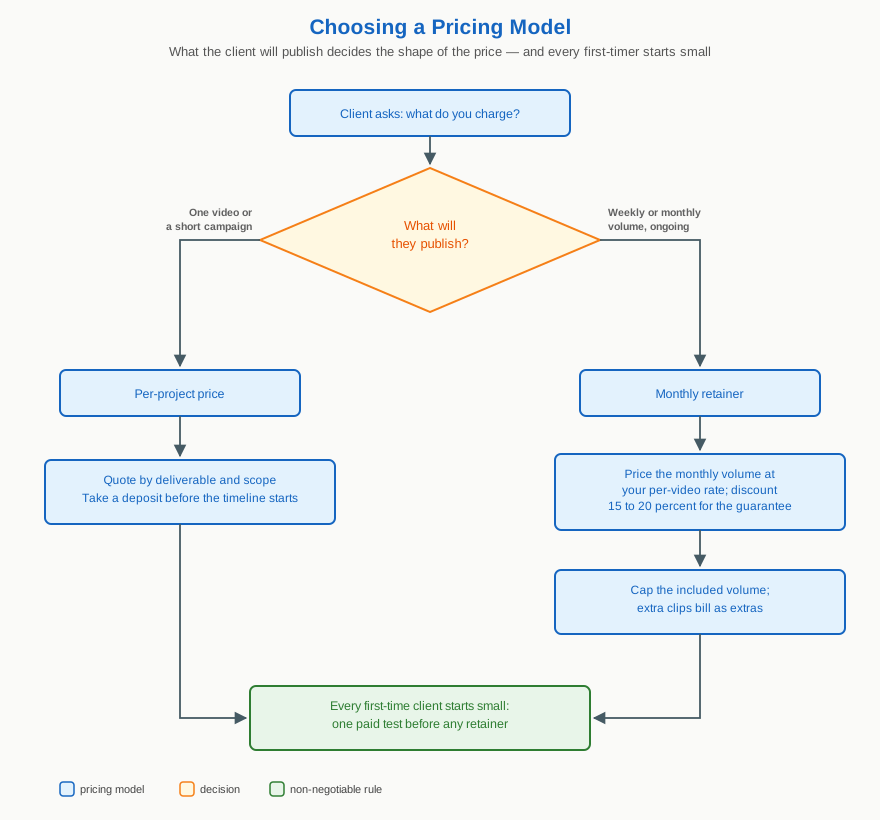
Three rules live inside that diagram. Retainers get a modest discount, not a halving, because what the client buys is certainty and what you sell is a reserved calendar. Every retainer caps its included volume, or the busiest client will quietly consume your whole month for one price. And nobody, however charming the call, starts at a retainer: the first deliverable is always a paid test project.
The ladder is mapped and the traps are marked. Before you climb it, look hard at what the climb feels like day to day, because the week itself is the product you are saying yes to.
Downloads for this lesson
Keep going — you're working through Start a Video Editing Service.
All courses are free ↗